
Download Old Face – Make Me Old Photo Editor, Android App, Free, Fun, Filters, Stickers, Age Change, Selfie
Overview
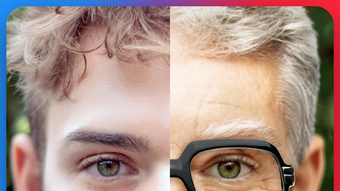
The Old Face app is a free Android tool designed for users seeking a fun and creative way to transform their selfies into aged versions of themselves. Developed by PlayWood, the application allows individuals to experiment with visual aging effects by adding realistic wrinkles, gray hair, and gray beards to their facial features. The app enables users to simulate the appearance of an older man with minimal effort, making it ideal for entertainment and social sharing.
It is particularly suited for casual users and social media enthusiasts who enjoy playful photo editing and want to surprise friends or family with humorous transformations. The software operates entirely within the mobile environment, requiring no external tools or complex workflows. Real-world usage scenarios include preparing for themed parties, creating content for social media, or simply exploring personal identity through visual experimentation.
The app’s focus on age alteration through filters and effects positions it as a lighthearted utility rather than a professional-grade image editor. The developer did not provide additional details about the app’s underlying technology or algorithmic processes.
Key Features & Capabilities
- Age Transformation Filters – Users can apply realistic aging effects to their selfies, including deep wrinkles, sagging skin, and age-related facial changes, simulating the look of an older man.
- Gray Hair and Beard Effects – The app provides tools to add gray or white hair and beards, enhancing the authenticity of the aged appearance.
- Accessory Additions – Users can overlay virtual glasses and hats to complete the elderly look, increasing the app’s creative flexibility.
- Real-Time Preview – Changes are applied in real time, allowing users to see the transformation instantly and adjust settings for optimal results.
- Free Access to All Features – The app offers full functionality without in-app purchases or paywalls, making all filters, stickers, and effects available at no cost.
These capabilities allow users to quickly generate entertaining and visually striking images for social media, messaging apps, or personal amusement. For example, a user might take a selfie before a birthday party and use the app to create a humorous “future self” image. The ability to combine multiple effects—such as wrinkles, gray hair, and a hat—enables rich customization. The app’s design prioritizes simplicity and immediate gratification, targeting users who value speed and fun over precision. The developer did not specify the technical approach behind the filters, but the seamless integration suggests optimized processing for mobile devices.
User Interface, Workflow & Performance
The user interface of Old Face is designed with simplicity and accessibility in mind, focusing on a streamlined workflow for rapid photo transformation. The main screen typically features a camera preview or photo gallery access, allowing users to select or capture a selfie directly within the app. Navigation is intuitive, with clearly labeled buttons for applying filters, adjusting effects, and saving or sharing the final image.
The app’s workflow minimizes steps: users select a photo, choose an aging effect, and apply it with a single tap. This efficiency supports quick experimentation and sharing. Performance observations are based on general software behavior patterns; the app runs on Android devices and is optimized for mobile processing.
The developer did not specify resource usage details, but the 24.8 MB installation size suggests a lightweight footprint. Stability is expected to be consistent with typical mobile apps of this category, though real-world performance may vary depending on device hardware. The app does not require a persistent internet connection, allowing full functionality offline.
Compatibility & System Requirements
Old Face is designed for Android operating systems and is compatible with devices running the specified version. The app has a file size of 24.8 MB, indicating a compact installation that should not significantly impact storage space on most Android devices. The developer did not provide detailed system requirements, including minimum RAM, CPU specifications, or supported Android versions beyond the platform name.
Compatibility information was partially provided, leaving exact device compatibility unclear. Users are advised to ensure their Android device meets standard app installation requirements. The developer did not specify whether the app supports tablet devices or different screen densities.
No additional hardware dependencies were mentioned.
Pros and Cons
Pros
- Completely free with no in-app purchases or hidden costs
- Simple, intuitive interface suitable for all age groups
- Real-time effects application for instant feedback
- Wide range of aging filters and accessories (glasses, hats)
- Offline functionality without internet dependency
Cons
- No information on supported Android versions or minimum system requirements
- Limited customization options for individual facial features
- Effects may appear artificial or less realistic on certain skin tones
- No option to undo or reset effects during editing
- App is limited to Android, with no support for iOS or desktop platforms
FAQ Section
Is Old Face available for iOS devices?
Currently, the app is only available for Android. There is no information on iOS support or future releases.
Do I need an internet connection to use Old Face?
No, the app functions entirely offline. All filters, effects, and editing tools are processed locally on the device.
Are there any in-app purchases or ads?
The app is completely free with no in-app purchases or advertisements. All features are accessible without cost.
Can I save or share my edited photos?
Yes, users can save the transformed images to their device or share them directly via messaging apps, social media, or email.
How often is Old Face updated?
The latest version is 1.0.1, released on May 15, 2024. No information is available on update frequency or future development plans.
Final Thoughts
Old Face delivers a simple yet engaging experience for users interested in playful photo transformation. Its core strength lies in offering a free, no-frills tool for simulating an aged appearance through realistic filters and accessories. While it lacks advanced editing capabilities and detailed customization, it excels in ease of use and immediate entertainment value.
The app is best suited for casual users, social media creators, and individuals looking for a fun way to experiment with their appearance. Its lightweight design and offline functionality make it accessible across a wide range of Android devices. Despite limited technical details and platform exclusivity, the app fulfills its intended purpose with clarity and consistency.
For those seeking a quick, secure, and fun way to change their age in photos, Old Face provides a satisfying solution. Download Old Face now.







